Give the drawing a clear purpose
State what environment the diagram explains, who owns it, when it was reviewed, and what level of detail it contains. A high-level information-flow drawing and a detailed technical network drawing can serve different purposes. Label them accordingly so a reader does not mistake one for the complete system description.
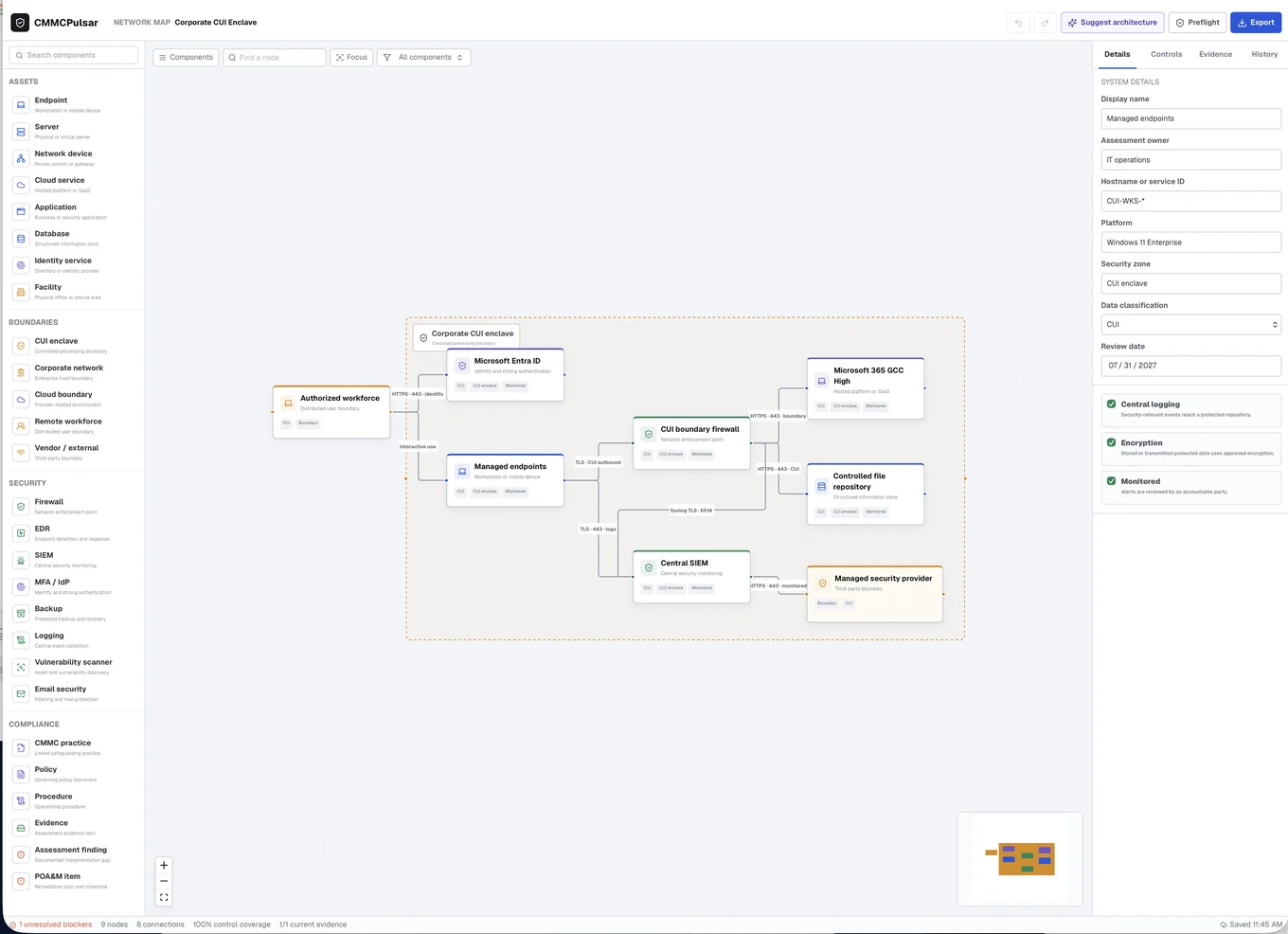
Start with the relevant users, endpoints, identity services, applications, storage, network boundaries, and external connections. Use meaningful names that agree with the inventory and implementation notes. An unexplained box called cloud makes it difficult to understand where information resides or who performs a security function.
Draw the relationships that matter
Show how relevant information enters, moves through, and leaves the environment. Distinguish ordinary business flows from administrative or security-management relationships when that helps the reader. Identify where a provider begins to perform work and what remains the organization’s responsibility.
Do not infer separation merely because two boxes are drawn apart. If the intended boundary depends on configuration, explain the connection to the actual technical implementation. The Level 1 scope guide and 32 CFR 170.19 provide context for level-specific decisions.
Verify before polishing
Review the drawing with people who administer the systems and people who use the business workflow. Compare it with current inventories, configurations, and service relationships. Ask about remote access, file synchronization, backups, support access, and other routes relevant to the environment.
If AI helps draft a diagram, treat every connection and boundary as a proposal to check. A plausible-looking flow can still omit a critical service or invent a relationship. Record corrections before improving colors and layout. The quality of the diagram depends on its accuracy and usefulness, not the number of icons.
Keep the diagram connected to change
Assign an owner and define which changes require review. A new application, tenant, site, provider, or remote-access method may affect both the drawing and the supporting documentation. Update the inventory, implementation descriptions, and relevant evidence references together.
Control access to detailed diagrams according to their sensitivity. Use a sanitized high-level illustration for public discussions and an approved location for operational detail. CMMC Pulsar’s architecture workflow can help organize the record, while the technical owner remains responsible for verifying that the drawing reflects the real environment.
Sources & further reading
Published October 24, 2026. Government and company references were checked while preparing this page. General information and practical workflow suggestions; confirm the requirements and services that apply to your organization.